In today’s fast-paced digital world, convenience is everything. While sending M-PESA to a till number is quick, sometimes you want to browse all available options, purchase for a friend, or simply avoid the hassle of typing in numbers. That’s where buying Bingwa Sokoni bundles online comes in.
Since 2019, Bingwa Sokoni has provided affordable data, SMS, and voice bundles to thousands of satisfied customers across Kenya. Their online platform takes the convenience factor to the next level, offering a visual interface where you can see all active deals, compare packages, and complete purchases in just a few clicks.
In this comprehensive guide, we’ll walk you through exactly how to buy Bingwa Sokoni bundles online, whether you’re purchasing for yourself or sending data to a loved one.
Why Buy Bingwa Sokoni Bundles Online?
Before diving into the step-by-step process, let’s explore why the online method might be your best option:
1. See All Offers at a Glance
When you use till numbers, you need to remember specific prices and what they correspond to. The website displays everything visually—daily bundles, monthly packages, SMS deals, and minute offers—all in one place.
2. Easy Gifting
Want to buy data for your friend, parent, or employee? The online platform makes it simple to enter their phone number as the recipient while you make the payment.
3. No Typing Errors
Ever sent money to the wrong till number? The online process eliminates that risk completely.
4. Access to Special Offers
Some promotions and bundle combinations are highlighted on the website, ensuring you never miss a great deal.
5. Purchase History
The online platform helps you keep track of what you’ve bought and when.
Getting Started: The Official Website
All online purchases begin at the official Bingwa Sokoni website:
👉 Official Website: https://bingwasokoni.co.ke
This is the only authorized online portal for purchasing Bingwa Sokoni bundles. Always ensure you’re on the correct site to protect your personal information and M-PESA transactions.
Step-by-Step Guide: How to Buy Bingwa Sokoni Bundles Online
Follow these simple steps to purchase your bundles through the website:
Step 1: Visit the Website
Open your browser (Chrome, Safari, or Firefox) on your phone, tablet, or computer and go to https://bingwasokoni.co.ke.
The homepage welcomes you with current promotions, including any special offers like “Get 10% extra data on all bundles this week!”
Step 2: Browse Available Bundles
The website is organized into clear categories to help you find exactly what you need:
Popular Features Section
Here you’ll find quick-access options to the most sought-after services. You can also click “Explore All Features” to see everything available.
Today’s Offers
These are short-term, high-value deals perfect for immediate needs:
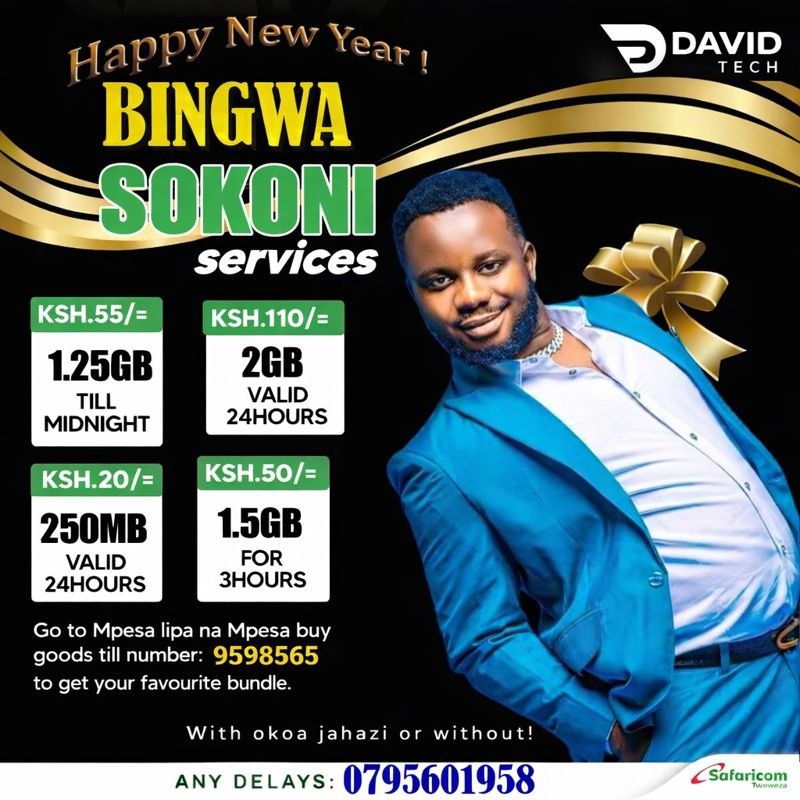
- 1.25GB – Ksh 55 (Valid Till Midnight)
- 250MB – Ksh 20 (24 Hours)
- 2GB – Ksh 110 (24 Hours)
- 300 Mins – Ksh 495 (30 Days)
Monthly Bundles
For users who need consistent connectivity all month long:
- 300 Mins + 500 SMS – For frequent callers
- 800 Mins + 1000 SMS – For heavy communicators
- 8GB + 400 Mins – BEST VALUE (Data + calls balance)
Data Bundles
The website breaks down data packages by usage type:
- Daily Bundle – Perfect for browsing and social media (24-hour validity)
- Till Midnight Bundle – Work and entertainment (valid until midnight)
- 24-Hour Bundle – Heavy usage and streaming (full 24 hours)
Step 3: Select Your Desired Bundle
Once you’ve found the perfect bundle, click the “Buy” button or “Buy Bundle” associated with that offer.
For monthly bundles like “8GB + 400 Mins,” you’ll see a “Buy Bundle” button that takes you to the purchase page.
Step 4: Choose Who Receives the Bundle
This is where the online method shines. You’ll be presented with two options:
Option A: Buy for Yourself
If you’re purchasing for the number you’re using to pay, simply confirm your number and proceed.
Option B: Buy for Another Number
This is perfect for gifting or supporting someone else. You’ll see a prompt like “Buy for Another Number” or “Buy Bingwa Sokoni Bundles to Another Number.”
To purchase for someone else:
- Click on the option to buy for another number
- Enter the phone number that will pay (your number)
- Enter the phone number that will receive the bundle
- The system ensures the data loads to the correct line
Step 5: Complete M-PESA Payment
After entering the recipient details, you’ll be directed to a secure payment gateway. Follow these steps:
- You’ll see the total amount to pay (e.g., Ksh 950 for 8GB + 400 Mins)
- A payment request will be sent to your M-PESA
- Check your phone for the M-PESA prompt
- Enter your PIN to authorize the transaction
- Wait for the confirmation message
Step 6: Instant Activation
Once payment is confirmed, the system works automatically. Within seconds, both you and the recipient (if different) will receive confirmation that the bundle has been loaded.
The website promises instant activation—no waiting, no manual processing.
How to Automate Your Bingwa Sokoni Purchases
One advanced feature available through the website is automation. This is particularly useful for businesses or individuals who need to schedule regular purchases.
To automate purchases:
- Visit bingwasokoni.co.ke
- Click on the “Shop Now” button
- Select the offer you want to automate
- Click on “Buy for Another Number”
- Enter the paying number and receiving number
- Your data purchases will be automated for future transactions
Purchasing SMS and Minutes Online
The online platform isn’t just for data. You can also buy SMS bundles and voice minutes through the same process:
SMS Bundle Options:
- 1000 SMS for 7 days
- 200 SMS for 24 hours
- 20 SMS for 24 hours
Minutes Bundles:
- 300 Mins + 500 SMS (30 days)
- 800 Mins + 1000 SMS (30 days)
The purchase process is identical: select the bundle, choose recipient, pay via M-PESA, and receive instantly.
Troubleshooting: What If You Don’t Receive Your Bundle?
Bingwa Sokoni prides itself on reliable, instant delivery. However, on rare occasions, network issues can cause delays. If your bundle doesn’t arrive within a few minutes:
- Confirm your M-PESA message – Ensure the transaction was successful and you have the receipt
- Check the recipient number – Verify you entered the correct phone number
- Contact support immediately:
- Call, SMS, or WhatsApp: 0795601958
- Email: info@bingwasokoni.co.ke
Keep your M-PESA transaction ID handy when contacting support—it helps them resolve your issue faster.
Important Tips for Online Purchases
To ensure smooth transactions every time, keep these points in mind:
✅ Do’s:
- Always use the official website: https://bingwasokoni.co.ke
- Double-check recipient phone numbers before confirming
- Keep your M-PESA PIN secure—never share it
- Bookmark the website for easy future access
- Check for special promotions highlighted on the homepage
❌ Don’ts:
- Don’t enter your M-PESA PIN on any site other than the official Safaricom prompt
- Don’t purchase from unofficial third-party websites claiming to sell Bingwa bundles
- Don’t ignore the “Buy once per day per number” recommendation for optimal service
Online vs. Till Number: Which Should You Use?
Both methods are valid, but they serve different needs:
| Scenario | Best Method |
|---|---|
| Quick purchase, know exactly what you want | Till Number (9598565 or 4185628) |
| Browsing available options | Online |
| Buying for someone else | Online |
| First-time user | Online |
| No internet access | Till Number |
| Checking for new promotions | Online |
What Customers Say About Bingwa Sokoni
The website features testimonials from real users who appreciate the service:
“Bingwa Sokoni has made buying data bundles so easy and affordable. I no longer worry about running out of data!” – Elvis Obeni
“I love how fast the bundles are activated. The app is user-friendly and the customer service is excellent!” – Jane Kariuki
“Best value for money! The monthly bundles save me so much compared to other providers. Highly recommended!” – David Njoroge
Frequently Asked Questions
Q: Can I buy bundles online for a different network?
A: Bingwa Sokoni offers are currently for Safaricom numbers in Kenya only.
Q: Is there a mobile app?
A: Yes! Bingwa Sokoni has an official Android app available on the Google Play Store for even easier purchasing.
Q: Are there any extra charges for buying online?
A: No. The price you see on the website is exactly what you pay via M-PESA.
Q: Can I see my purchase history online?
A: The website helps you track your transactions, making it easy to manage your spending.
Q: What’s the validity for daily bundles?
A: Daily bundles are typically valid for 24 hours, while “Till Midnight” bundles expire at midnight on the day of purchase.
Conclusion
Buying Bingwa Sokoni bundles online is the smart choice for users who want convenience, clarity, and control. Whether you’re purchasing data for yourself, sending minutes to a family member, or loading SMS credits for your business, the website makes the process simple and instant.
With affordable prices, a wide range of packages, and excellent customer support, Bingwa Sokoni continues to be a top choice for Kenyans seeking reliable connectivity.
Ready to buy your bundles online?
Visit the official website today, browse the latest offers, and enjoy instant activation!


https://shorturl.fm/iNcVF
https://shorturl.fm/LiOdD